If you are asking Rack Builder to look at an unusual group of original medals, clear photographs of the front, the back, the rim and any clasps or attachments are the fastest way to answer the questions a reviewer is likely to ask. Take them on a soft, clean surface, handle the medals as little as possible, do not clean or dismantle anything first, and use soft side light rather than a flash. Then label each image and send only what the team needs.
Why do photographs help a complex rack review?
Rack Builder arranges awards using the selected jurisdiction, current published guidance and award-specific rules, and unusual or conflicting groups are flagged for manual review before production.[2] After checkout, the team reviews the saved rack against the selected jurisdiction and published order of wear guidance, and contacts you when an award, clasp, layout or personal detail needs clarification.[1]
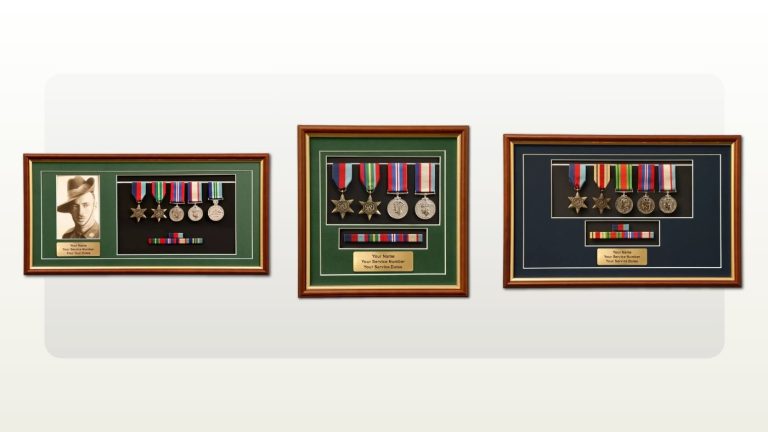
With originals, the questions are often practical. Which clasps are actually present? Is a ribbon loose or missing? Is a medal already on an old bar? Photographs let you and the team look at the same object before the medals leave your home. Original medal mounting is a specialist service arranged through the Rack Builder support page, and the team will guide you through sending the medals safely.[4] Customer-supplied original medals can also be framed through the same route.[5]
What can photographs not do?
A photograph shows what a medal looks like. It does not show that a person was entitled to it. Keep these limits in mind before you start:
- Retail review is about configuration. Rack Builder's common groups provide a starting point only and do not confirm entitlement, so check the recipient's service record, award documents or the relevant authority before ordering.[2]
- Entitlement questions go to the awarding authority. For a relative's medals, Rack Builder points families to the Honours and Awards division of the Department of Defence, and to the National Archives of Australia for researching service history.[2]
- Service records may not settle it either. The National Archives notes that service records may include reference to service medals but may not show which service medals a person was entitled to.[9]
- Appearance is not proof of origin. Defence notes that replicas can be purchased from medals dealers or commercial military memorabilia outlets, and that many are high quality and can be difficult to distinguish from the originals.[8]
Step 1: Prepare a safe surface and handle the medals as little as possible
Choose a stable table away from food and drinks, and lay down a clean, undyed cloth so nothing scratches or slides. Work on one medal or one mounted bar at a time.
Handling is where most avoidable damage happens. The Australian War Memorial advises handling a medal as little as possible, as acid from your fingers can harm it, and recommends soft cotton gloves when handling medals or any precious article.[6] Defence gives the same advice: acid from hands can tarnish medals and degrade the ribbon fabric, so reduce handling or consider soft cotton gloves.[7]
Practical tips:
- Wash and dry your hands before you start, even if you wear gloves.
- Hold a medal by its edges, not by the ribbon.
- Leave a mounted group on its bar. Turn the whole bar over rather than pulling individual medals.
Step 2: Do not clean, polish or dismantle anything first
Resist polishing a dull medal or straightening a tired ribbon before taking photos. Defence advises that cleaning medals should only be done when necessary, as the process may damage the sharpness of the design or remove metal from the surface.[7] The Australian War Memorial does not recommend polishing unless absolutely necessary.[6]
Ribbons need the same restraint. Defence advises not to wash ribbon fabric, as the dyes may run or bleed, and not to iron it.[7] The National Archives suggests consulting a conservator if you are in doubt about how to care for objects in a family archive, particularly if you are contemplating any cleaning or repairs.[10]
Photograph the medals exactly as they are. Wear, old stitching and loose parts are useful information for the reviewer.
Step 3: Set up light that shows detail without glare
Polished metal reflects light, and glare can hide the very details a reviewer needs. Heritage photography guidance written for war memorials makes three points that apply equally on a tabletop: the camera flash tends to generate large amounts of glare off glass surfaces, so it should generally be avoided; if a reflection is too bright and washes out the image, take the photo from a slight angle; and avoid shadows wherever possible.[11]
A simple home setup:
- Work near a window in bright daylight, out of direct sun.
- Turn the flash off.
- Hold the phone parallel to the medal for the main shots, then tilt slightly if a reflection hides the design or lettering.
- Use the camera's highest quality setting. The same guidance notes that high resolution photos help inscriptions and areas of damage be clearly seen.[11]
Rack Builder's published requirement for photo frame prints asks for a JPEG or PNG of at least 1200 by 1800 pixels and advises avoiding screenshots and compressed social media copies.[1][2] That applies to frame photographs, not review images, but the same habits help.
Step 4: Follow a consistent shot list
Shoot every medal in the same order so nothing is missed. The memorial guidance recommends photographing each plaque with as much close-up detail as possible, and taking close-ups of any areas of damage or concern.[11] For medals, that means one overall view, then close-ups.
| Photo | What to show | Why it helps the review |
|---|---|---|
| 1. Whole group, front | Every medal and ribbon laid out as you received it, or the mounted bar face up | Shows the full group and current arrangement at a glance |
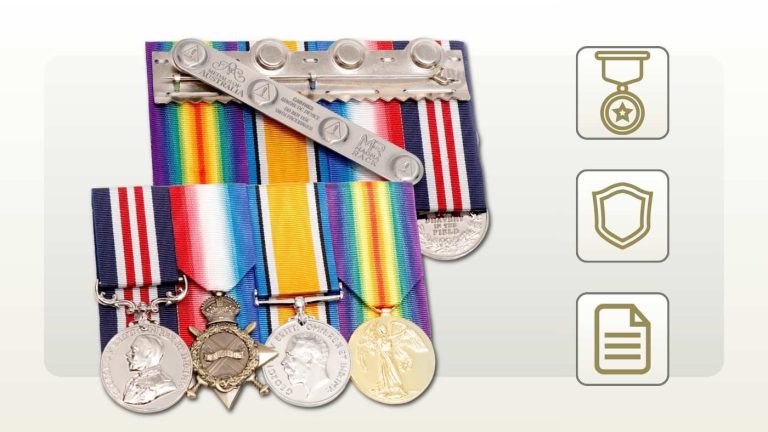
| 2. Whole group, back | The reverse of the bar or the backs of loose medals | Shows existing pins, stitching, hooks or old mounting hardware |
| 3. Each medal, front | One medal per image, filling most of the frame | Lets the team match each item to the library record |
| 4. Each medal, back | The reverse of the same medal | Some designs and details only appear on the reverse |
| 5. Each rim or edge | Close-up of any lettering or numbers on the edge, turned slowly if needed | Helps keep each medal with its recipient record |
| 6. Clasps and attachments | Close-up of every clasp, emblem or device on the ribbon, including loose ones | Confirms exactly which attachments are physically present |
| 7. Condition close-ups | Any frayed ribbon, broken suspension, loose stitching or damage | Flags handling or repair questions before the medals are sent |
| 8. Loose items and documents | Loose clasps, spare ribbon, boxes, or the relevant page of an award document, with private details covered | Connects loose parts to the right medal |
Step 5: Label, check and send the images with care
Name each file clearly so you can easily remember what it features, for example "Medal-3-rim-2" or "Bar-back".[11] Then view every image at full size and retake any that are blurred, glare-washed or cut off.
Privacy matters. Rim lettering and documents can carry names, service numbers and other personal details. Send only the images needed to answer the review question, and cover irrelevant details on documents. You do not need to send a full service record unless the team asks. Rack Builder states that uploaded frame photographs are kept only as long as needed to produce and support the order.[2]
Rack Builder's support page asks you to include the saved rack reference or order number when you have one.[3] The published pages do not set out a format or upload method for review photos, so ask the support team how they would like to receive them. A short enquiry could read:
"Hello, I have a saved rack, reference [saved rack reference], for [number] original medals I would like [court mounted or swing mounted]. The group includes [brief description, for example a loose clasp or an old bar]. I have photographs of the front, back, rims and clasps of each medal. How would you like me to send them?"
A worked example: a mixed original group with loose parts
This is a hypothetical example, not a real customer order or an entitlement assessment.
A family holds a relative's original medals. Four are on an old bar, two are loose in a tin, and there is a separate clasp that no one can place. They have built a saved rack in Rack Builder using the award list they believe is correct, and they want the originals mounted together.
They lay the group on a cotton cloth near a bright window. Wearing cotton gloves, they photograph the old bar front and back, each loose medal front, back and rim, and the loose clasp from both sides. The first rim photo is unreadable because of glare, so they turn off the flash, tilt the phone slightly and retake it. They do not polish anything or separate the medals from the bar.
They name the files by medal and view, check each at full size, then contact Rack Builder support with the saved rack reference and ask how to send the images.[3]
Because the group is unusual, it may be flagged for manual review,[2] and the team will make contact if an award, clasp or layout needs clarification.[1] Whether the loose clasp belongs to their relative at all is an entitlement question for Defence and the service record, not something a photograph or retail review can settle.[2][9]
Getting help from Rack Builder
For original medals, start with the support page, because original mounting and framing are arranged through support.[4][5] Include your saved rack reference or order number,[3] explain what is unusual about the group, and ask how the team would like to receive your photographs. You can also call (02) 6123 2996, Monday to Thursday 9:00 to 17:00 and Friday 9:00 to 16:30.[3]
Still building the rack? How it works explains the four steps and what to have ready, and notes that an account is needed to save a rack and saved racks expire after 90 days.[1] The FAQ covers order of wear, product formats and care.[2]
If you are not sure whether your group needs an individual review at all, our guide on when to request an expert review of a medal group explains what to check first.
Frequently asked questions
How do I photograph medals for a mounting review?
Photograph each medal front, back and rim, then every clasp, attachment and any damage, working on a soft, clean cloth near a bright window with the flash off. Do not clean or dismantle anything first. Label each file clearly, check every image at full size, and ask Rack Builder support how they would like to receive the photos.[11]
Should I clean or polish old medals before photographing them for mounting?
No. Photograph the medals exactly as they are, because wear, old stitching and loose parts are useful information for the reviewer. Defence advises cleaning medals only when necessary, as it may damage the sharpness of the design or remove metal, and not washing or ironing ribbon fabric.[7] The Australian War Memorial does not recommend polishing unless absolutely necessary.[6]
How do I stop glare when taking photos of medals?
Turn the camera flash off and work near a window in bright daylight, out of direct sun. Hold the phone parallel to the medal, then tilt it slightly if a reflection washes out the design or lettering. Heritage photography guidance advises avoiding flash glare, using a slight angle for bright reflections and avoiding shadows wherever possible.[11]
Should I wear gloves when handling original medals?
Yes. Soft cotton gloves are recommended, and you should handle medals as little as possible either way. The Australian War Memorial says acid from your fingers can harm a medal,[6] and Defence says it can tarnish medals and degrade ribbon fabric.[7] Wash and dry your hands first, hold medals by the edges and leave mounted groups on their bar.
Can photos of my grandfather's medals prove he was entitled to them?
No. A photograph shows what a medal looks like, not whether a person was entitled to it, and Rack Builder's review is about configuration, not entitlement.[2] For a relative's medals, Rack Builder points families to the Honours and Awards division of the Department of Defence, and to the National Archives of Australia for service history.[2] Service records may not show medal entitlement either.[9]
Can Rack Builder mount or frame my original medals?
Yes. Original medal mounting is a specialist service arranged through the Rack Builder support page, and the team will guide you through sending the medals safely.[4] Customer-supplied original medals can also be framed through the same route.[5] Include your saved rack reference or order number when you contact support, and ask how they would like to receive your photographs.[3]
Sources
Source pages reviewed 13 October 2026. Numbered citations in the article open the sources below.
- Rack Builder: How it works Post-checkout review, the four steps, what to have ready, saved racks and photo frame file requirements.
- Rack Builder: FAQ Rack Builder questions and answers: arrangement, manual review, common groups, relatives' medals, photo files and retention.
- Rack Builder: Support Saved rack reference or order number, phone number and opening hours.
- Rack Builder: Full-size medals Original medal mounting arranged through the support page.
- Rack Builder: Medal frames Customer-supplied original medals can be framed, arranged through the support page.
- Australian War Memorial: Conservation advice: Medals Last updated 22 December 2020. Minimal handling, cotton gloves and polishing advice.
- Department of Defence: Caring for medals Handling, cleaning medals and caring for ribbon fabric.
- Department of Defence: Replacement medals Replicas from medals dealers or commercial military memorabilia outlets.
- National Archives of Australia: Finding a service record Service records may refer to service medals but may not show entitlement.
- National Archives of Australia: Caring for your personal physical collection Consult a conservator when in doubt, particularly before cleaning or repairs.
- NSW Office for Veterans Affairs: Guidelines for Photographing War Memorials (PDF) General photography principles: flash glare, slight angle, shadows, resolution, close-ups and file naming.